Worksheets Free · No login · PDF · 45 KB

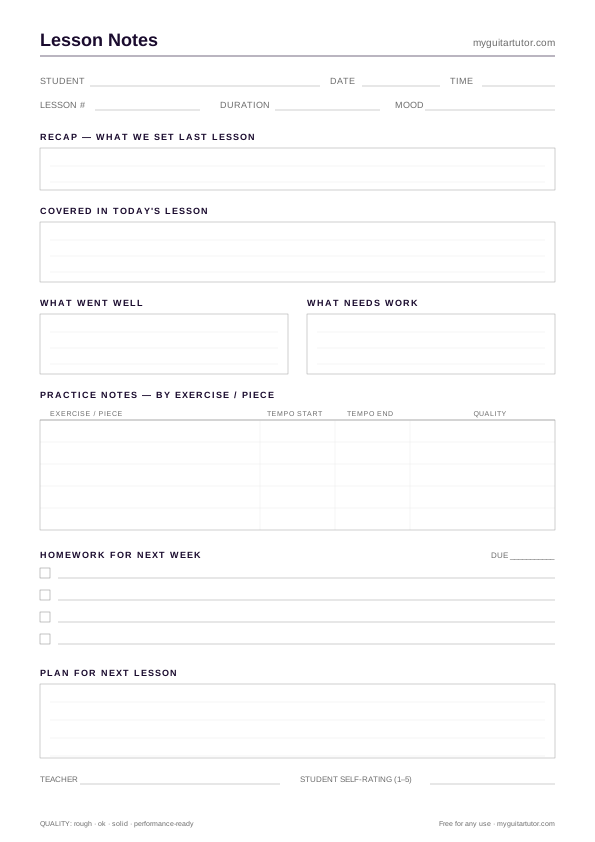
Guitar Lesson Notes Template

A free printable lesson notes template for guitar tutors. Where the planner looks forward, this looks back — capturing what actually happened in the session so the next lesson starts running, not stalling.

#lesson-notes #template #tutors #record-keeping #printable

Free for personal practice, classroom & lesson use. No attribution required.

What lesson notes are actually for

Most guitar tutors keep notes in some form — a Google Doc per student, an Apple Notes folder, the back of last week’s lesson plan. The trouble is consistency. When you teach twenty students a week, the format of your notes for student A drifts away from the format for student B by week six, and by week twelve you can’t compare like with like.

This template fixes the inconsistency by giving every lesson exactly six sections in the same order: recap, covered today, what went well, what needs work, practice notes, homework, plan for next lesson. Every student. Every session. You can flip between students mid-term and find the same shape of information in the same place on the page.

The two-way record

The teacher-rating and student-rating fields at the bottom are deliberate. Lessons are a shared activity, and the student’s view of how it went matters. Sometimes a student walks away thinking it went badly when you thought it was a breakthrough lesson — the ratings surface that gap so you can talk about it. Use them as a 5-point scale, or just a quick high-medium-low — either way the gap between teacher and student rating is the most interesting data point on the page.

A4 portrait at 100% scale. Stacks of fifteen sheets on the music stand. Or, if you teach online and prefer digital, the SVG alternate exports cleanly to a fillable PDF in most editors. At the end of each term, scan or photograph the pile per student — the archive becomes your single source of truth for what every student has covered, when, and how.

How to use it

How to use the guitar lesson notes template

  1. 01

    Fill it in during the lesson, not after

    Keep the sheet on your music stand or next to your laptop. Jot notes as you teach — tempos achieved, sticky spots, that thing the student said about a song they wanted to learn. Five minutes of in-lesson note-taking beats fifteen minutes of "what did we cover?" after the fact.

  2. 02

    Use the recap line to close last week's loop

    The first row asks "what did we set last time?" — fill this in from the previous week's sheet before the student arrives. It takes thirty seconds and turns scattered lessons into a continuous teaching arc.

  3. 03

    Be specific in "what went well / what needs work"

    "Strumming pattern locked in by bar 8 — bring tempo up next week" is useful. "Strumming OK" is not. Specific notes mean you know exactly what to open next week with.

  4. 04

    Set homework in writing, on the sheet

    The four-row homework block isn't cosmetic. Writing the homework down (and reading it back to the student) increases practice rates significantly. Pair with the weekly practice log handed to the student.

  5. 05

    Archive the sheets per student, per term

    Twelve weeks of notes per student becomes the most valuable teaching artifact you own. Use them to write end-of-term reviews, demonstrate progress to parents, or hand over cleanly to a covering tutor.

FAQ

Quick
answers.

The questions teachers most often ask about this resource — sizing, licensing, how to actually print it.

Should I take lesson notes during the lesson or after?

During. Almost every tutor who waits until "after the lesson" ends up either skipping the notes entirely or writing vague summaries. The sheet is designed to be filled in real-time — it sits flat on the music stand and the sections are small enough that you can jot a line between exercises.

How long should I keep lesson notes for?

At minimum, the duration of the teaching block (a term or 12 weeks). Many tutors keep the previous year's notes too — they're invaluable when a student takes a summer break and returns in September. Long-term, the GDPR retention guidance for student records is "as long as you have a legitimate teaching relationship plus a reasonable buffer."

What's the difference between this and the lesson planner?

The lesson planner is pre-lesson: what you intend to cover. This notes template is post-lesson: what you actually covered, what went well, what needs work. Many tutors use both — planner stapled to notes, one pair per lesson.

Can I customise it to add my studio's logo?

Yes — download the SVG alternate and open it in Figma, Inkscape, Affinity Designer or Illustrator. The structure is plain vector geometry; drop your logo into the header, change the accent colour, re-export. Both versions remain free to use under the same terms.

Does it work for online lessons (Zoom, FaceTime, Skype)?

Yes — the structure is identical online. Some tutors keep the printed sheet next to the camera; others fill in a PDF version live on a tablet. The "practice notes" table is arguably more valuable online, where tempo and quality observations are easier to forget by the next session.

How should I handle notes if I teach the same student twice a week?

Use one sheet per lesson. The recap row at the top of sheet B references sheet A from earlier in the week, sheet C references B, and so on. By the end of the term you have a complete chronological record rather than two parallel half-records.

Ready?

Grab the pdf.

Download PDF · 45 KB
Keep digging

Related resources.

More templates and charts in the same workflow.