Worksheets Free · No login · PDF · 46 KB

Guitar Lesson Planner

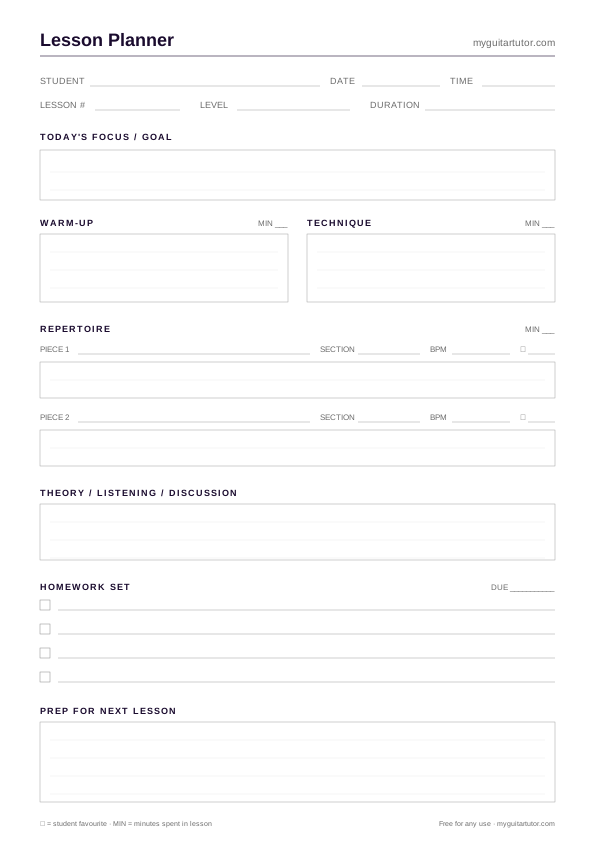
A free printable guitar lesson planner — one A4 page per student, per lesson. Five blocks (warm-up, technique, repertoire, theory, homework) sized to the way one-to-one guitar lessons actually run. Print, write, teach.

#lesson-plan #template #tutors #teaching #printable

Free for personal practice, classroom & lesson use. No attribution required.

A lesson plan that mirrors how guitar lessons actually run

The blank-piece-of-paper approach to lesson planning is what most tutors do — and what most tutors complain about. By the third or fourth lesson with a student you have nothing to compare against; by the third term you can’t remember what they worked on last May.

This planner solves that with a fixed structure: five blocks that map to the way one-to-one guitar lessons actually unfold. Warm-up to settle the hands, a focused technique segment, two repertoire slots (so the student isn’t playing the same song for the third week running), a short theory or ear-training block, and a homework section that sets the next week’s practice. A “prep for next lesson” box at the bottom captures what to open with next time — the most useful single line on the sheet.

Why pre-printing a stack matters

A planner only helps if you actually use it. The friction of opening a document, typing in a name, and saving it as a new file is enough that most tutors abandon planning altogether and improvise. Pre-print a stack of fifteen of these, keep them by the music stand. Grab one, write the student’s name at the top, you’re planning. The whole exercise takes two minutes.

Built for paper, designed for digital

The PDF is the default download because most working tutors print. The SVG alternate is for the smaller group who want to edit it — add a studio logo, change the accent colour, swap a section header. The file is plain vector geometry, so it opens cleanly in Figma, Inkscape, Affinity Designer, Illustrator, or any modern SVG editor. Both versions are A4 portrait at 100% scale; the SVG also scales up if you want a wall-print version for a teaching room.

How to use it

How to use the guitar lesson planner template

  1. 01

    Print one sheet per student, per lesson

    Open the PDF and print at 100% scale on A4 portrait paper. Most tutors keep a small printed stack by the music stand and grab one sheet at the start of each lesson — fast, durable, no laptop in the way.

  2. 02

    Fill the header before the lesson starts

    Student name, date, lesson number, level and duration. Doing this in advance turns the sheet into a permanent record of the term — invaluable for parents asking what their child has been working on, or for handing over to a covering tutor.

  3. 03

    Pre-plan the five teaching blocks

    Warm-up (5 min), technique focus (10 min), repertoire slot A and B with target BPM (20 min combined), theory or ear-training (5–10 min), homework. Pre-fill what you intend to cover — you can always deviate, but starting with a plan keeps the lesson moving.

  4. 04

    Mark up what actually happened during the lesson

    As you teach, tick what got done, scribble what didn't. The "what actually happened" notes are more valuable than the plan itself — they tell you what to start next week with.

  5. 05

    Use the "prep for next lesson" box to close the loop

    In the last two minutes, jot the one thing you want to open the next session with. Pair the planner with the lesson notes template if you want a separate after-the-fact record, or with the weekly practice log handed to the student.

FAQ

Quick
answers.

The questions teachers most often ask about this resource — sizing, licensing, how to actually print it.

Is the guitar lesson planner free for commercial use?

Yes — free for use in paid lessons, your own teaching studio, group classes, online courses, and any commercial teaching context. No attribution required, no licence fees. The only thing we ask is that you don't resell the file as-is on stock marketplaces.

How long does each block on the planner take?

The default split is built around a 60-minute lesson: warm-up 5 min, technique 10 min, two repertoire slots 20 min combined, theory 5–10 min, homework 5 min. For 30 or 45 minute lessons, the same shape works — see How to plan a guitar lesson for the timing splits per format.

Can I edit the planner to add my studio's logo?

Yes — that's what the SVG alternate is for. Download the SVG and open it in Figma, Inkscape, Affinity Designer, or Illustrator. Drop your logo into the header, change the accent colour to match your branding, and re-export to PDF.

Should I plan every lesson in advance or improvise?

Plan, but leave room to improvise. The biggest mistake is teaching identical lessons week after week. The biggest second mistake is showing up with no plan at all. The planner is a scaffold, not a script — fill in the structure, then teach the student in front of you.

What's the difference between the planner and the notes template?

The planner looks forward: this is what we're going to cover today. The lesson notes template looks back: this is what we actually covered, what went well, what needs work. Many tutors use both — planner pre-lesson, notes post-lesson.

Does this work for online lessons over Zoom?

Yes — the structure is the same whether the student is in the room or on a screen. Some tutors keep the planner on a tablet next to the camera; others print it and refer to it just as they would in person. The "what actually happened" notes are arguably more important online, where it's easier to lose the thread of the lesson.

Ready?

Grab the pdf.

Download PDF · 46 KB
Keep digging

Related resources.

More templates and charts in the same workflow.